
Product description
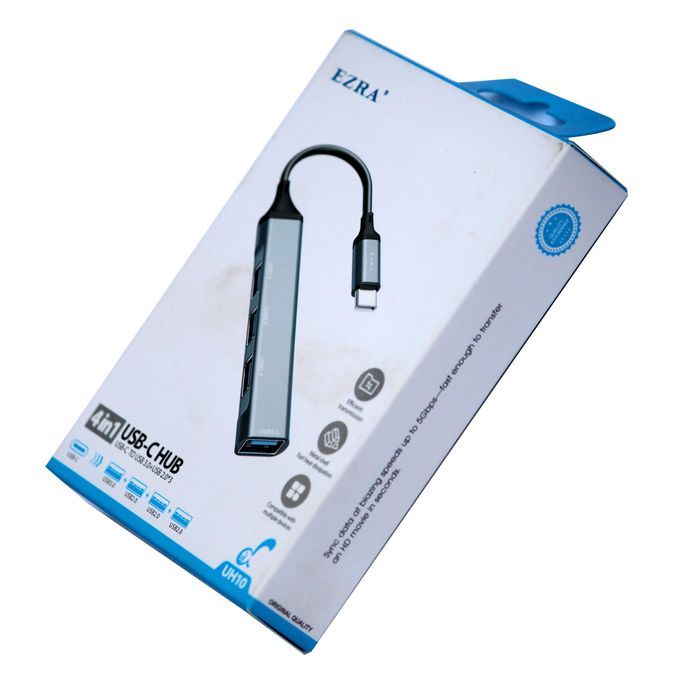
UH10 4-in-1 USB-C Hub – Expand Your Device Connectivity
- Introduction to the UH10 4-in-1 USB-C Hub:
The UH10 4-in-1 USB-C Hub is a connectivity accessory designed to help users connect compatible peripherals to devices equipped with a suitable USB-C port. Whether you work in an office, study at university, or manage a home workstation, a USB-C hub can provide additional connection options when your computer has limited available ports.
Modern laptops and other electronic devices often feature a compact design with fewer physical connections. This can create challenges when you need to connect accessories such as keyboards, mice, flash drives, and other compatible equipment. A multi-port hub helps bring supported connections together through a single host connection.
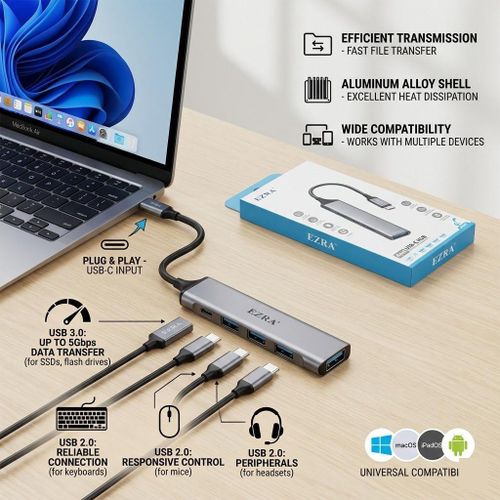
The UH10 is identified as a 4-in-1 USB-C hub. Before purchasing, check the manufacturer’s specifications to confirm the exact port configuration, supported USB standards, data-transfer speeds, and any additional functions.
- Four-in-One Connectivity for Everyday:
Use A key purpose of the UH10 4-in-1 USB-C Hub is to provide multiple connection options through one accessory. This can help reduce the need to repeatedly disconnect peripherals when switching between different tasks.
Depending on its confirmed port configuration, the hub may support compatible USB accessories such as keyboards, mice, flash drives, and other peripherals. The exact connections available will depend on the ports fitted to this particular model.
For students, a USB-C hub can be useful when connecting computer accessories for assignments, research, presentations, and everyday study. Office users may find it helpful for arranging a workstation, while home users can use a compatible hub to connect the peripherals they regularly need.
However, the four-in-one designation does not automatically confirm which ports are included. It also does not guarantee support for video output, network connections, memory cards, or simultaneous high-power charging. Check the actual product specifications before relying on any of these functions.
- USB-C Compatibility and Device Support:
The UH10 uses a USB-C hub designation, making host-device compatibility an important consideration. USB-C is a reversible connector found on many modern laptops, tablets, smartphones, and other electronic devices.
Before connecting the hub, confirm that your device has a compatible USB-C port. It is also important to understand that not every USB-C port supports the same functions. Depending on the host device, a port may support data transfer, charging, video output, or a combination of these capabilities.
The hub’s own specifications determine which functions it can provide. Having a USB-C connector does not automatically mean that the UH10 supports external displays, laptop charging, or every USB-C feature.
For the best results, compare the hub’s supported standards and functions with your device’s requirements. This can help prevent compatibility issues and ensure the accessory is appropriate for your intended setup.
- Workspace Organization and Practical Convenience:
A USB-C hub can make a workstation more flexible by providing a central connection point for compatible peripherals. Rather than constantly switching accessories between limited ports, users can connect supported devices through the hub.
The UH10 4-in-1 USB-C Hub can be considered for home offices, study areas, and other computer workspaces where additional connectivity is required. It may help organize connections for everyday activities such as typing, transferring files, and using supported accessories.
For example, a compatible laptop user may want to connect a mouse and keyboard while keeping another available connection for a USB storage device, depending on the hub’s actual port layout.
If portability matters, check the hub’s dimensions, cable design, and construction before purchasing. Do not assume specific materials, a particular cable length, or a compact foldable design unless these details are confirmed by the manufacturer.
- Choosing and Maintaining the UH10 USB-C Hub:
When selecting the UH10 4-in-1 USB-C Hub, consider the devices you intend to connect and the functions you need. Port availability, data-transfer performance, host compatibility, and power requirements are important factors to review.
Connect the hub carefully to a compatible USB-C port and follow the manufacturer’s instructions. Avoid forcing connectors, pulling cables sharply, or exposing the device to moisture or excessive heat. If you plan to connect power-demanding peripherals, verify that the hub can support their requirements.
Before adding the product to your online store, confirm these details:
Product name: UH10 4-in-1 USB-C Hub.
Host connection: USB-C, subject to product verification.
Port configuration: Confirm the number and types of available ports.
Data-transfer speed: Verify the supported USB standard.
Compatibility: Check supported computers, tablets, and peripherals.
Additional functions: Confirm video output, charging, or other capabilities if available.
Package contents: Verify whether cables or additional accessories are included.
The UH10 4-in-1 USB-C Hub is a useful accessory to consider when expanding connectivity on compatible devices. Checking its verified specifications helps you choose a hub that suits your workspace and everyday computing requirements.
Reviews
There are no reviews yet.