
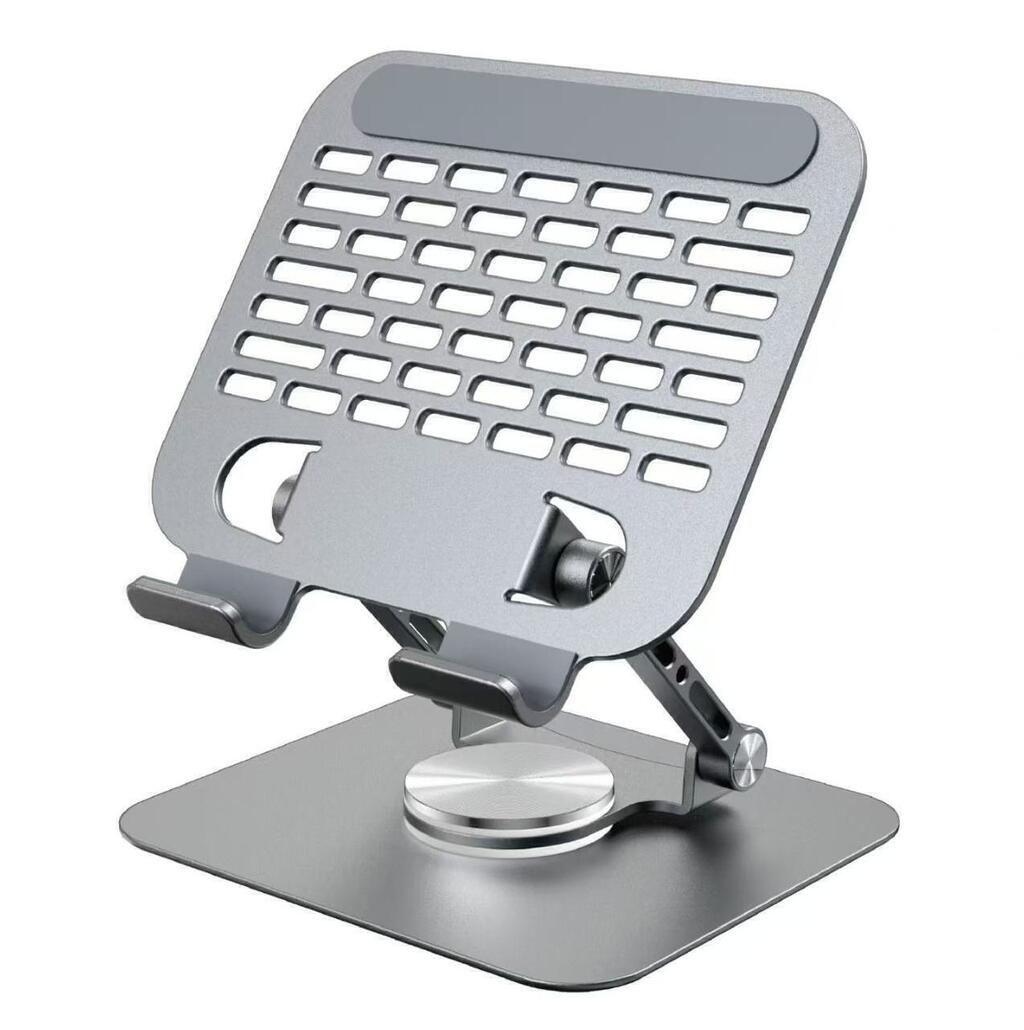


Product description
HL134 Laptop Stand – Practical Laptop Support for Your Workspace
- Introduction to the HL134 Laptop Stand:
The HL134 Laptop Stand is a laptop accessory designed to provide a dedicated support platform for your computer. Whether you work from home, study at school or university, or use a laptop in an office, a laptop stand can help you organize your workspace and create a more comfortable computer setup.
Laptops are convenient because they are portable and can be used in different locations. However, placing a laptop directly on a desk may not always provide the screen position or working arrangement you prefer. A laptop stand can help raise or position the computer, depending on the stand’s design, allowing you to arrange your workspace according to your needs.
The HL134 model is suitable for customers looking for a dedicated laptop-support accessory. Before purchasing, check the manufacturer’s specifications for its material, dimensions, maximum supported weight, adjustment options, and compatible laptop sizes. These details help you determine whether the stand is appropriate for your particular laptop.
Whether you are setting up a study desk, improving your home office, or organizing a professional workstation, the HL134 Laptop Stand is an accessory worth considering as part of your everyday computer setup.
- Workspace Organization and Laptop Positioning:
A well-organized workspace can make everyday computer tasks easier to manage. The HL134 Laptop Stand can provide a designated place for your laptop, helping separate it from other items on your desk and create a more structured working environment.
Depending on its construction and design, a laptop stand may position the screen higher than a laptop placed directly on a flat surface. This can give users more flexibility when arranging their keyboards, notebooks, mouse, and other desk accessories.
Laptop positioning is particularly important for people who spend time writing assignments, preparing documents, attending online meetings, browsing the internet, or working with software applications. A stand can form part of a setup tailored to these activities.
For improved ergonomic comfort, consider the height and angle of the laptop screen in relation to your sitting position. If raising the laptop makes its built-in keyboard uncomfortable to use, an external keyboard and mouse may help create a more suitable arrangement.
The HL134’s exact height, tilt, and adjustment capabilities should be confirmed before listing these as product features. A clear understanding of its design will help customers choose an accessory that fits their preferred workspace.
- Laptop Compatibility, Construction, and Stability:
Compatibility is an important factor when selecting the HL134 Laptop Stand. Laptop computers differ in screen size, overall dimensions, thickness, and weight. Checking the stand’s supported laptop dimensions and maximum load capacity can help determine whether it is suitable for your device.
The stand’s material and construction also influence its stability and intended use. Some laptop stands are made from metal, while others use plastic or a combination of materials. The specific construction of the HL134 should be verified from the product packaging or manufacturer documentation.
A suitable stand should support the laptop securely when positioned according to the manufacturer’s instructions. Before use, place it on a stable, level surface and ensure the laptop is properly positioned on its supporting area.
If the HL134 includes retaining lips, non-slip pads, adjustable joints, or foldable components, check the product itself to confirm these details. These features should not be assumed from the model number alone.
For online shoppers, accurate information about compatibility, dimensions, materials, and weight limits makes it easier to compare laptop accessories and select one that meets their requirements.
- Laptop Ventilation and Everyday Productivity:
Laptop ventilation is another consideration when arranging a computer workstation. Many laptops release heat through vents located on their underside, sides, or rear. Depending on its design, a laptop stand may allow more space around some of these areas than placing the computer directly on a surface that restricts airflow.
However, ventilation benefits depend on the stand’s construction and the location of the laptop’s cooling vents. The HL134 should not be described as having active cooling, built-in fans, or a guaranteed temperature-reduction capability unless these features are confirmed.
A stand can also help make a workspace more practical by giving the laptop a consistent position for everyday tasks. Students can use a laptop stand while preparing assignments or researching study materials, while office workers may find one useful when organizing a desk for documents, video calls, and computer-based work.
For users who connect an external monitor, keyboard, or mouse, a laptop stand can form part of a broader workstation arrangement. The best configuration depends on the available desk space, the laptop’s design, and the user’s preferred working position.
- How to Use and Maintain the HL134 Laptop Stand:
To get the best results from the HL134 Laptop Stand, begin by checking the manufacturer’s instructions and confirming that the stand is compatible with your laptop.
Place the stand on a firm, level desk or table. Position the laptop carefully, ensuring that it sits securely and that its weight is distributed as intended. Avoid exceeding the manufacturer’s stated load limit, and do not force adjustment mechanisms or joints beyond their designed range.
Keep the stand clean by removing dust and wiping its surfaces with an appropriate soft cloth. If the stand has moving parts, folding sections, or adjustable joints, inspect them periodically for looseness or damage. Follow the manufacturer’s care instructions, especially if the product contains materials that require specific cleaning methods.
When choosing the HL134 for your workspace, consider these product details:
Product name: HL134 Laptop Stand.
Primary purpose: Supporting a compatible laptop on a desk or other suitable surface.
Laptop compatibility: Confirm the supported laptop dimensions and weight.
Material and construction: Verify the actual materials used.
Adjustment options: Check whether the stand offers adjustable height, tilt, or folding functionality.
Ventilation design: Inspect the platform and confirm whether it allows airflow around the laptop.
Package contents: Check which accessories, if any, are included.
The HL134 Laptop Stand is a practical accessory to consider when organizing a laptop-based workspace. By confirming its specifications and matching them to your computer, you can make a more informed decision about its suitability for studying, office work, or everyday computing.




Reviews
There are no reviews yet.